#include "BIFILTER.H"
HANDLE CALLBACK FilterLevels( HDIB hDIB,
int iInFrom,
int iInTo,
int iMidtone,
int iOutLow,
int iOutHigh,
int Channel,
int iShowProgress,
HWND hParent)
Description
This function will will adjust the input image’s histogram by the specified input parameters. Levels filtering is a usually nonlinear transformation mapping the original histogram from pixel value iInFrom to pixel value iInTo. The output histogram can be specified with the lowest and highest output pixel level, and with the pixel value from the original image that will be the middle pixel level in the output image. Pixels out of range iInFrom ... iInTo will be mapped to iOutLow or iOutHigh values. This function works for only 8 bit per bixel and 24 bit per pixel images.
Examples
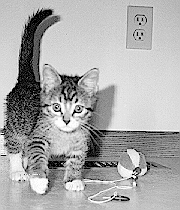
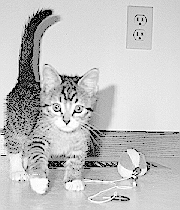
The original 180 x 210 pixel image and the levels filtered image with iInFrom = 0, iInTo = 255, iInMidtone = 46, iOutLow = 0, iOutHigh = 255, Channel = 0 parameter values.
Parameters
|
HDIB |
HDIB |
Handle of the DIB to filter. |
|
int |
iInFrom |
The lowest input pixel value of the transformation. |
|
int |
iInTo |
The highest input pixel value of the transformation. |
|
int |
iMidtone |
The input pixel value to be mapped to the middle value in the output image. |
|
int |
iOutLow |
The output histogram’s lowest pixel value. |
|
int |
iOutHigh |
The output histogram’s highest pixel value. |
|
int |
Channel |
Color channel to be filtered. If the input image is a 8 bit per pixel grayscale image changing of Channel input parameter will have no effect.
Available values: 0 - All color channels. 1 Red channel. 2 - Green channel. 3 - Blue channel. |
|
int |
iShowProgress |
This parameter specifies the displaying of the progressbar and the preview dialog. Available values: DISPLAY_NONE (0) - The progressbar and the preview dialog will not display before filtering. DISPLAY_PROGRESS (1) -The progressbar will display during filtering procedure. DISPLAY_DIALOG (2) - The preview dialog will display before filtering. This dialog shows the part of the image before and after filtering. DISPLAY_BOTH (3) - The progressbar and the preview dialog will display. IMPORTANT: The preview dialog will only display, if there is BiDlgs.dll installed. |
|
HWND |
HParent |
Handler of the parent window. |
Return values
The handle of the new filtered DIB or NULL if an error occurred.
Programming notes
The function will not free the input DIB.
Requirements
Header : Declared in BIFilter.h; include BIFilter.h.
Library : Use BIFilter.lib.
DLLs : BIFilter.dll , BIDlgs32.dl.