#include "BIDISP.H"
VOID CALLBACK DisplayImage( HWND hWnd,
HBITMAP hBitmap,
HPALETTE hPal,
LPRECT lprScroll,
LPPOINT lpptDPI,
LPRECT lprScale,
WORD wDisplayFormat)
Description
This function displays the bitmap image passed as a device dependent bitmap. The DisplayImage() function should be called only in response to the WM_PAINT message.
Parameters
|
HWND |
hWnd |
Window handle to display image. |
|
HBITMAP |
hBitmap |
Device dependent bitmap handle. |
|
HPALETTE |
hPal |
Bitmap's palette handle. |
|
LPRECT |
lprScroll |
The scroll range in physical coordinates |
|
LPPOINT |
lpptDPI |
Dot per inch resolution of the image. |
|
LPRECT |
lprScale |
The X and Y scaling factor. |
|
WORD |
wDisplayFormat |
Display mode. |
Return values
None.
Programming notes
If hPal is NULL it will not be used.
if lpptDPI is NULL or the x and y field is zero, then DPI resolution will default to the screen resolution.
The scaling factor is stored in the RECT data structure where one can define the ratio for scaling for the X or Y coordinate by two integers as 3:4 or 13:19 in the lprScale->left and lprScale->top field for X coordinate and lprScale->right and lprScale->bottom for the Y coordinate. For example:
Scaling in X axis = left:top 1:3 increase the image width by three times.
Scaling in Y axis = right:bottom 1:3 increase the image height by three times.
WORD wDisplayFormat can be set to DISP_NORMAL, DISP_ZOOM, or DISP_PREVIEW. The DISP_NORMAL will display the image proportionally. The DISP_ZOOM user has to set the lprScale factor to reflect the zoom in or out factor. The DISP_PREVIEW forces the image to fit into the client area.
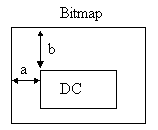
The lpScroll parameter has meaning only when the Bitmap is larger then the Device Context (DC).
If lpScroll.left is < 0 then lpScroll.right is the top let corner of the Bitmap relative to the DC and the distance of ‘a’ = lpScroll.right (Inch/100.)
If lpScroll.left is > 0 then ‘a’ is computed as ‘a’= lpScroll.let(bitmap pixel) + lpScroll.right(DC pixel).
If lpScroll.top is < 0 then lpScroll.bottom is the top let corner of the Bitmap relative to the DC and the distance of ‘b’ = lpScroll.bottom (Inch/100.)
If lpScroll.left is > 0 then ‘b’ is computed as ‘b’= lpScroll.top(bitmap pixel) + lpScroll.bottom(DC pixel).
Requirements
Header : Declared in BIDisp.h; include BIDisp.h.
Library : Use BIDisp.lib.
DLLs : BIDisp.dll.
Code Example
#include "BIDISP.H"
.
.
.
case WM_PAINT:
// Image is in the bitmap
DisplayImage(hWnd, hCurrentBitmap, hPal, &rScroll, &ptDpi, &rScale, nDispFormat);
break;
.
.
.