

Description This method will filter the image with the Enhance filter. The method works for only monochrome, 8 and 24 bit per pixel images.
Examples
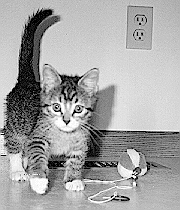
The original 210 x 180 pixel image and the Enhance filtered image.
Syntax RetVal = [BiFilter.]FilterEnahnce hDib iShowProgress hWnd
Returns RetVal LONGLONG The handle of new filtered DIB, 0 if an error occurred, or -1 if the BIFilter.dll does not installed.
Remarks hDib LONGLONG Handle of the image to filter.
iShowProgress short This parameter specifies the displaying of the progressbar and the preview dialog.
Available values:
DISPLAY_NONE (0) - The progressbar and the preview dialog will not display before filtering.
DISPLAY_PROGRESS (1) - The progressbar will display during filtering procedure.
DISPLAY_DIALOG (2) - The preview dialog will display before filtering. This dialog shows the part of the image before and after filtering.
DISPLAY_BOTH (3) - The progressbar and the preview dialog will display.
IMPORTANT: The preview dialog will only display, if there is BIDlgs32.dll installed.
hWnd LONGLONG Handler of the parent window.
Matrix of the Enhance filter:
See Also FilterLaplace Method, FilterGauss Method, FilterGradient Method, FilterUniform Method, FilterWeightedMean Method