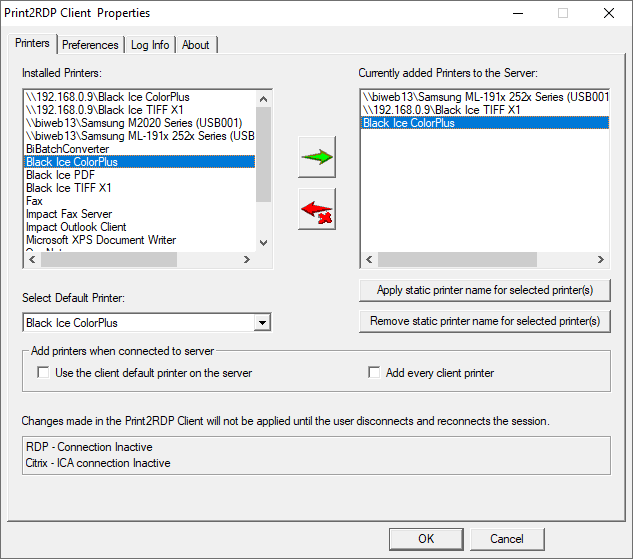
Users can send Static Printer Name Requests to the Print2RDP server. The administrator of the server can enable Static Printer Name Requests. When the static printer name is enabled for the user, the static printer name appears for the user at the next logon. Mapped printers appear with Session IDs until the administrator enables a static printer name for the user.
To send a Static Printer Name Request, perform the following steps:
1. Open Print2RDP Client.
2. Add a printer to the Currently added Printers to the Server box.
3. Select the printer from the right-side list, and press Apply static printer name for selected printer(s).
4. “Static name” appears behind the selected printer’s name in the right-side list.
NOTE: An information message box will appear, to inform the user that the administrator needs to apply the static printer name.
To remove the static name from printers, select the printer(s) from the right-side list, and click on Remove static printer name for selected printer(s).
