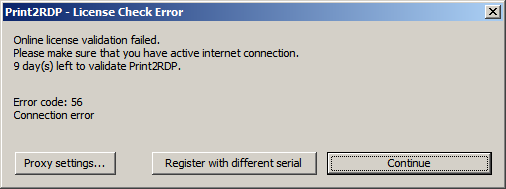
Transferable license requires online validation at least once every month. If Print2RDP is registered with a transferable license then the Print2RDP will attempt to connect to the Black Ice License server via the internet to validate the license. For the license validation the Print2RDP will require an active internet connection on the computer.
If your computer is not connected to the internet or a firewall is blocking your computer’s connection for more than a week and license validation fails, the Print2RDP will display a warring notification message of how many days are left before you must validate the license or the software will become disabled.
Click on the Continue button to continue using the Print2RDP Server. Print2RDP Server remains fully functional and can be used until 30 days without online validation.
If the time period for the online validation is expired, and Print2RDP Server was unable to validate the license due to the lack of active internet connection, Print2RDP Server offers the following options:
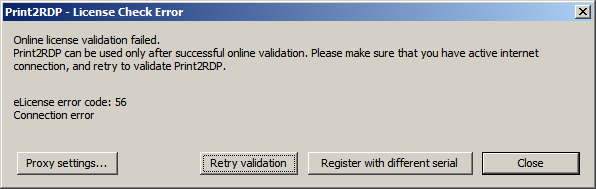
· Proxy Settings can be used to configure a proxy server to access the Black Ice License Server for the validation.
· One can attempt online validation by clicking on the Retry validation button. Before retrying the online validation, please make sure that your computer has active internet connection.
· Clicking onClose and Register with different serial allows the Administrator to register the Print2RDP Server without active internet connection, using manual registration. Please be aware, that after the manual registration, the license will not be transferable anymore! This option is recommended in highly restricted environments without internet connection.